Email communication is essential for every website owner, business, and organization. If your website is hosted with Polanhost LLC, accessing your professional email account is simple and secure through your client dashboard.

In this guide, we will explain how to log into your email account using your client dashboard on Polanhost LLC, step by step.
What Is the Polanhost Client Dashboard?
The Polanhost LLC client dashboard is a centralized control panel where customers can:
- Manage hosting services
- Access cPanel
- Create and manage email accounts
- View invoices and billing details
- Control domains and security settings
Using the dashboard ensures you have full control over your hosting and email services in one place.
Requirements Before Logging In
Before proceeding, make sure you have:
- An active hosting plan with Polanhost LLC
- Your client area login details
- An email account already created in cPanel
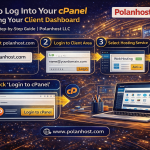
Step-by-Step Guide: How to Log Into Your Email Account Using Your Client Dashboard
Step 1: Visit the Polanhost Website
Open your browser and go to: https://www.polanhost.com
Click on Client Login or Client Area.
Step 2: Log In to Your Client Dashboard
Enter your email address/username and password used during registration, then click Login.
Step 3: Select Your Hosting Service
Once logged in:
- Navigate to Services
- Click on My Services
- Select the active hosting plan linked to your email account
Step 4: Access cPanel
Inside your hosting service page, click Login to cPanel.
This will automatically redirect you to your cPanel dashboard without requiring additional login credentials.
Step 5: Open Email Accounts
In cPanel:
- Scroll to the Email section
- Click on Email Accounts
- Locate the email address you want to access
- Click Check Email
Step 6: Choose Webmail Interface
You will be asked to choose a webmail client such as:
- Roundcube
- Horde
- SquirrelMail
Select Roundcube (recommended) to access your inbox instantly.
🎉 That’s it! You are now logged into your email account.
Alternative Way: Direct Webmail Login
You can also access your email via:
https://yourdomain.com/webmail
Use your full email address and email password.
Benefits of Using Polanhost Email Services
Customers choose Polanhost LLC email hosting because of:
- Secure and spam-protected email system
- Easy access via client dashboard
- Professional domain-based email addresses
- Reliable uptime and fast servers
- Beginner-friendly interface
Common Issues and Solutions
Forgot email password?
→ Reset it from Email Accounts in cPanel.
Cannot access webmail?
→ Clear browser cache or try another browser.
Need help?
→ Contact Polanhost LLC customer support for assistance.
Why Polanhost LLC Is Trusted for Email & Hosting in Nigeria
Polanhost LLC is known for:
- Affordable hosting plans
- Reliable customer support
- Secure infrastructure
- Easy-to-use client dashboard
- Trusted by individuals and businesses in Nigeria and internationally
Conclusion
Logging into your email account using the Polanhost LLC client dashboard is fast, secure, and beginner-friendly. Whether you are managing business emails or personal domain emails, Polanhost provides a smooth experience with full control.